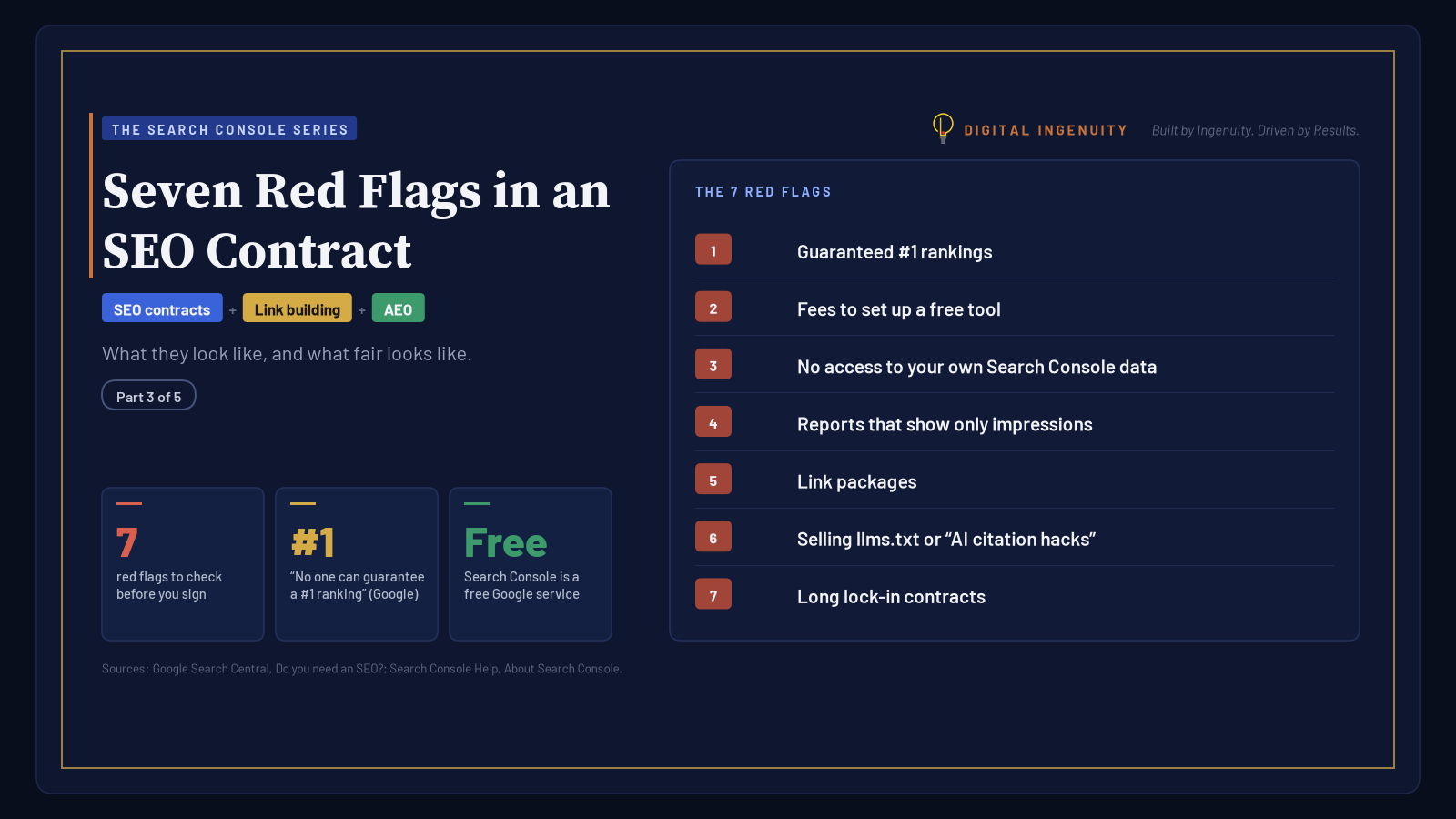
Key takeaways
- Google states that no one can guarantee a #1 ranking, so treat any ranking guarantee as a warning sign.
- Search Console is free; setup belongs in onboarding, and the property should be owned by your business, not the agency.
- Insist on owning every account and keeping direct access to Search Console and Google Analytics.
- Impressions-only reports, per-link pricing, and paid llms.txt or ‘AI citation hacks’ don’t match Google’s own guidance.
- A minimum term is reasonable; a long lock-in with no exit and no ownership of your work isn’t.
Most bad SEO contracts don’t look bad. They look confident. They promise rankings, include a handful of technical-sounding line items, and lock you in long enough that by the time you realize the reports never connected to revenue, you’ve paid for a year.
You can spot most of the risk before you sign. This post is about the paperwork itself: seven red flags in an SEO contract or proposal, why each one matters (with Google’s own guidance where it exists), and what a fair version looks like. None of them depends on agency size or price.
We’ve covered the sales conversation before. For warning signs in the pitch meeting, such as a team you never meet or a “proprietary process” black box, read marketing agency red flags. For agencies that rebrand old tactics as AI, see SEO agency red flags in the age of AI marketing. This one assumes you’re holding a proposal and a pen.
Key points
- Google says plainly that no one can guarantee a #1 ranking.
- Google Search Console is free. Setup is a small task, not a premium deliverable, and it should be in your name.
- You should own every account and keep full access to your own data.
- Impressions-only reports and purchased link packages are warning signs, not results.
- For Google Search, llms.txt files and “AI citation hacks” aren’t ranking levers. Google’s own guide says you can ignore them.
- A long term is fine. A long term with no exit and no ownership isn’t.
Red flag 1: Guaranteed #1 rankings
What it looks like: “Page one in 90 days or your money back.” “Guaranteed top-three placement for 20 keywords.”
Why it’s a problem: Google’s guidance for hiring an SEO is blunt: “No one can guarantee a #1 ranking on Google.” It also warns about SEOs who claim a “special relationship” with Google or a “priority submit.” Our earlier post covers why guarantees fail in practice. In a contract, the thing to read is the fine print: a guarantee usually covers keywords nobody searches, or a refund clause with conditions you can’t meet.
What good looks like: Realistic ranges tied to your data. For example: “These 15 queries sit on page two today. Here’s the work we’ll do on those pages and how we’ll report movement monthly.”
Ask: “Which keywords would the guarantee cover, and how many people search for them each month?”
Red flag 2: Fees to set up a free tool
What it looks like: “Google Search Console onboarding: $750.” “Analytics and Search Console integration package.”
Why it’s a problem: Google describes Search Console as a free service, and the setup is a short, documented process. It does take some care (choosing a Domain property, adding a DNS record, linking Google Analytics), and paying someone an hour or two of time for that is reasonable. Charging a premium for it, or treating it as proprietary work, is a sign the proposal is padding.
The bigger issue is whose name it’s in. If the agency creates the property under its own Google account, it owns your data.
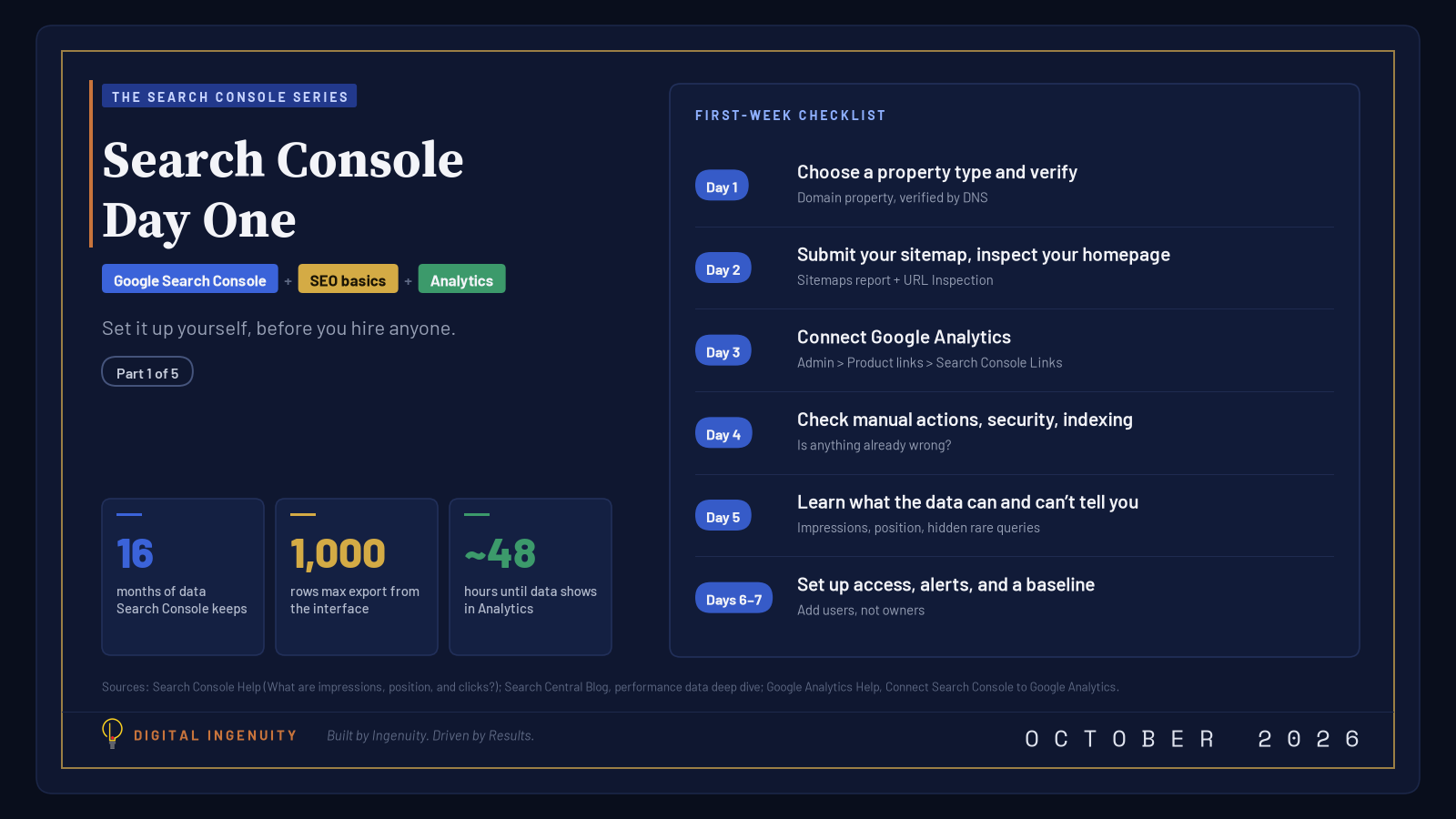
What good looks like: Setup included in onboarding, with the property owned by your business account and the agency added as a user. If you’d rather do it yourself, our Search Console Day One checklist walks through it.
Ask: “Whose Google account will be the verified owner?”
Red flag 3: No access to your own Search Console or Analytics data
What it looks like: “Results are shared through our proprietary dashboard.” Or nothing at all, because the contract is silent on access and ownership.
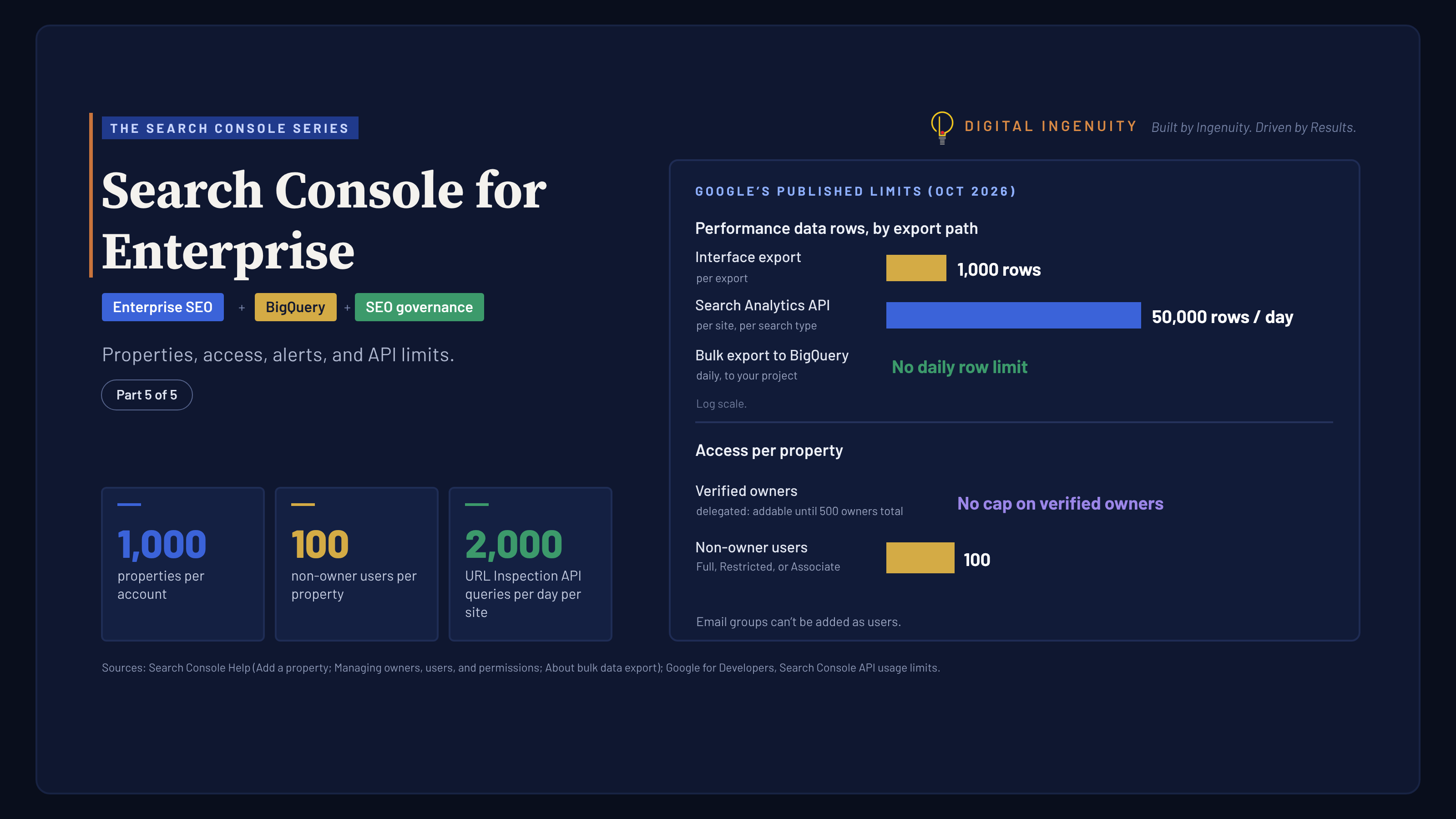
Why it’s a problem: Search Console has clear roles. Owners control everything, including who else has access. Full and Restricted users can view data. If all verified owners are removed, everyone else loses access after a grace period. Google’s own hiring advice suggests that if an SEO offers an audit, you grant only read access to Search Console at that stage. That advice assumes you hold the keys.
A dashboard is fine as an extra. It isn’t a substitute for direct access to the source.
What good looks like: A contract clause stating that the client owns all accounts (Search Console, Google Analytics, Google Business Profile, Tag Manager, and ad accounts) and that the agency’s access is removed at the end of the engagement.
Ask: “If we part ways, what do we keep, and how do we remove your access?”
Red flag 4: Reports that show only impressions
What it looks like: Monthly decks that lead with “Impressions up 340%!” and never mention clicks, leads, or revenue.
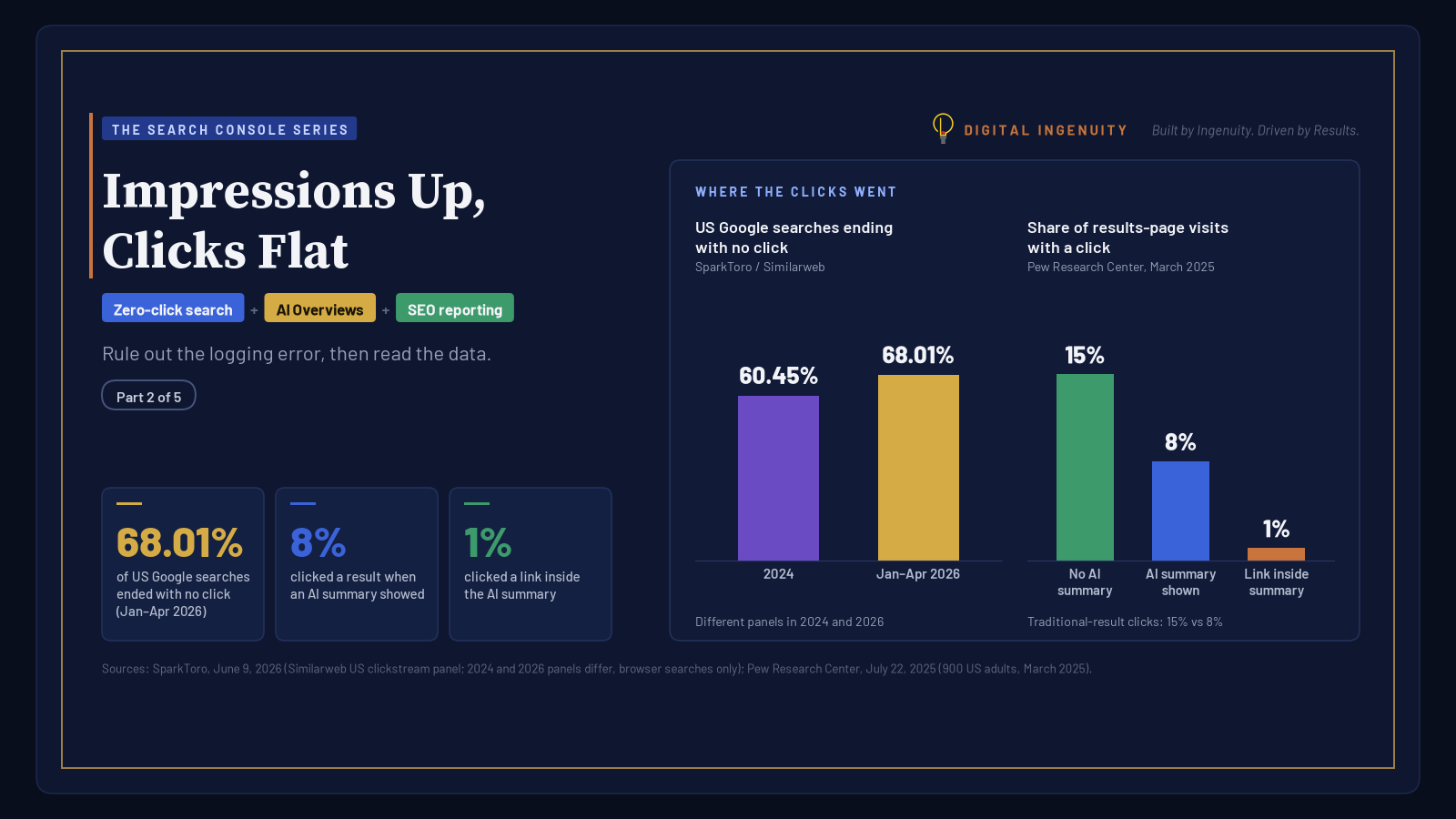
Why it’s a problem: In Search Console, an impression is counted when a link to your site appears on a results page, even if nobody scrolled to it. A ranking deep in the results for a popular query can produce many impressions and no visits. There’s also a newer trap: Google says a logging error misreported impressions, CTR, and average position from May 13, 2025 to April 27, 2026, and that history won’t be corrected. A deck that compares impressions across that window, without saying so, is comparing faulty numbers. Impressions can be a useful early signal. As the headline result, they’re a way to look busy. We explain how to read the numbers in Impressions Up, Clicks Flat.
What good looks like: A reporting clause that names the metrics up front: non-branded clicks to the pages that make money, movement of priority queries, and leads or calls, with impressions as supporting context.
Ask: “Which number in this report would tell us the work isn’t working?”
Red flag 5: Link packages
What it looks like: “50 high-DA backlinks per month.” “Guest-post package: 10 placements.”
Why it’s a problem: Google’s spam policies define link spam to include “buying or selling links for ranking purposes,” exchanging goods or services for links, and using automated services to create links. Sites that violate those policies can rank lower or disappear from results, and Google can issue a manual action for unnatural links. Google’s hiring guide adds two more warnings: “You should never have to link to an SEO,” and be wary of “link popularity schemes.”
Earned links still matter. Google’s local ranking guidance names how many websites link to your business as part of prominence. But they come from things worth linking to: real local partnerships, original data, press, and sponsorships, with paid links marked rel="sponsored" or rel="nofollow". We’ve written more about this in questioning link building in AI SEO.
What good looks like: A plan for earning mentions, with named targets and no per-link pricing.
Ask: “Can you list the sites these links would come from, and would we be paying them?”
Red flag 6: Selling llms.txt or “AI citation hacks”
What it looks like: “AI visibility package: llms.txt, AI-ready content chunking, and citation seeding.” “Guaranteed ChatGPT and AI Overview mentions.”
Why it’s a problem: Google’s 2026 guide to optimizing for generative AI features lists things you can ignore for Google Search. Among them are llms.txt files and other “special” markup (“Google Search itself doesn’t use them”), “chunking” content, rewriting content just for AI, chasing inauthentic mentions, and adding special schema. Google says an llms.txt file will “neither harm nor help” your visibility in Google Search.
Full disclosure: we keep an llms.txt file on our own site and include one, alongside structured data, in our local SEO work, because AI assistants outside Google Search may read it. That’s housekeeping, not a Google ranking lever, and it shouldn’t be priced or pitched as one. Google’s guidance on third-party advice says good advice either labels itself as opinion based on data or experience, or cites official documentation. Ask any “AEO” or “GEO” vendor which one they’re doing.
What good looks like: AI-search work that looks like good SEO: indexable pages, unique expert content, accurate Business Profile details, and measurement through Search Console’s Generative AI performance report.
Ask: “Which Google documentation supports this tactic?”
Red flag 7: Long lock-in contracts
What it looks like: A 12- to 24-month term, auto-renewal, no termination for convenience, and content or accounts that stay with the agency.
Why it’s a problem: SEO does take time. Google’s SEO Starter Guide says some changes take effect in a few hours and others take several months, and suggests waiting a few weeks to judge a change. A minimum term of a few months is reasonable. The red flag is a term designed to outlast your ability to judge results, especially when combined with flags 3 and 4. (We covered default long contracts as a sales tactic in our agency red flags post; here, read the termination, renewal, and ownership clauses.)
What good looks like: An initial term long enough for the work to show results, then month-to-month or a 30-day notice period. Every page, piece of content, and account you paid for stays with you.
Ask: “What happens if we want to leave after month four?”
A one-page contract checklist
| Clause | Healthy version |
|---|---|
| Rankings | Ranges and priority queries, no guarantees |
| Accounts | Client owns Search Console, Analytics, Business Profile, and ad accounts |
| Access | Agency added as a user and removed at exit |
| Reporting | Clicks, leads, and priority queries first; impressions as context |
| Links | Earned, named, and not priced per link |
| AI search | Grounded in Google’s guidance, with no “hacks” |
| Term | Clear initial term, then a 30-day exit; work product belongs to client |
Questions Google itself suggests asking
Google’s “Do you need an SEO?” page lists questions worth bringing to any pitch: Can you show examples of previous work? Do you follow Google Search Essentials? What results do you expect, and in what timeframe? What’s your experience in my industry, and in my city? Will you share every change you make and explain why? Google also notes that you’re ultimately responsible for the actions of anyone you hire.
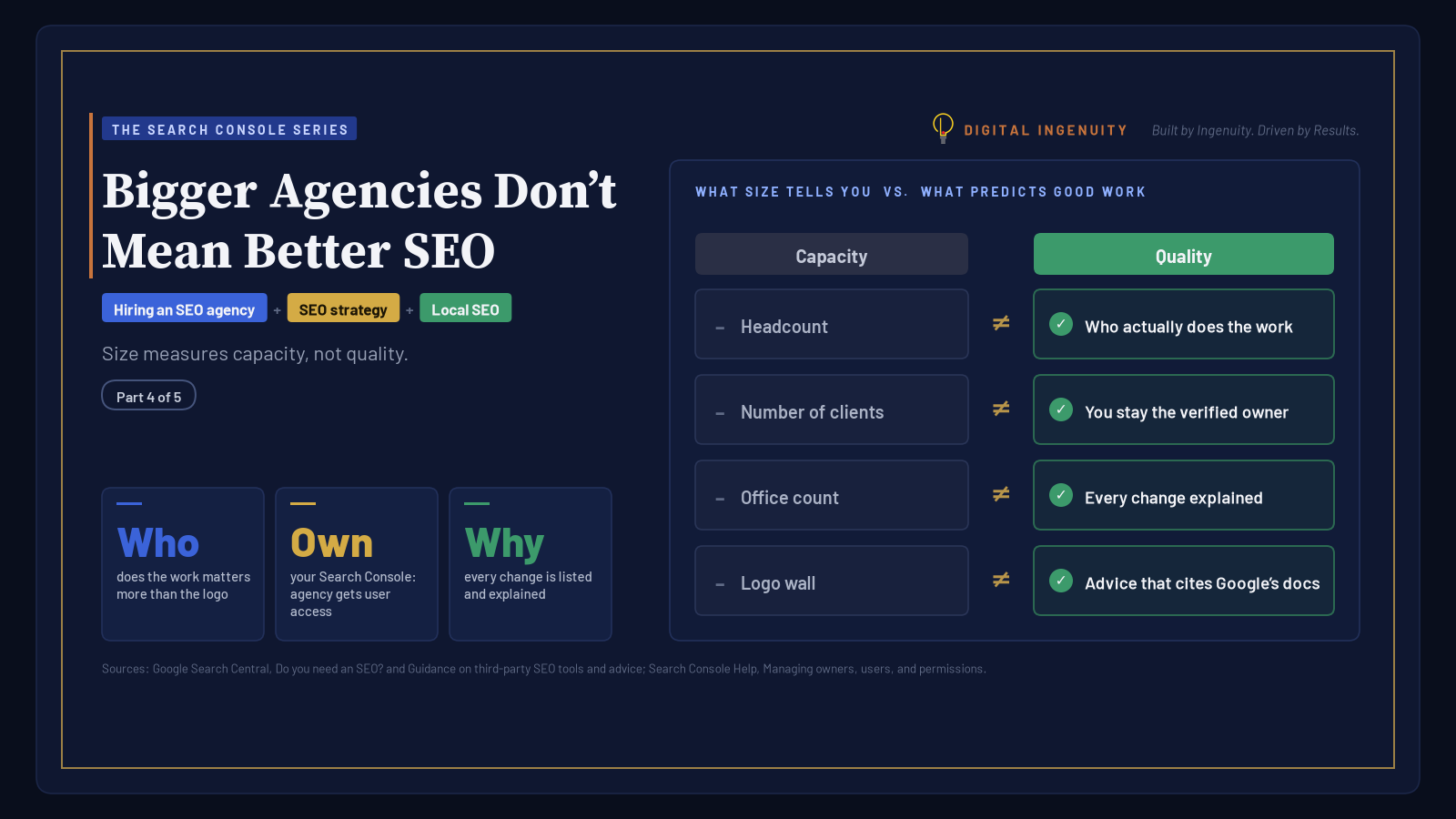
That last question about your city matters more than it sounds. Search results differ between Plano and Fort Worth, and a partner should be able to show you why. For a broader view of what an SEO service should include, and why the biggest proposal isn’t automatically the best one, see Bigger Agencies Don’t Mean Better SEO.
Have questions about your own setup? Contact us for more information.
Sources
- Do you need an SEO? (Google Search Central)
- Spam policies for Google web search (Google Search Central)
- Manual actions report (Search Console Help)
- Optimizing your website for generative AI features on Google Search (Google Search Central)
- Google Search’s guidance on third-party SEO tools and advice (Google Search Central)
- About Search Console (Search Console Help)
- Managing owners, users, and permissions (Search Console Help)
- What are impressions, position, and clicks? (Search Console Help)
- Tips to improve your local ranking on Google (Google Business Profile Help)
- SEO Starter Guide (Google Search Central)
- Data anomalies in Search Console (Search Console Help)